Should You Upgrade HMIs on Older Production Lines?




Should You Upgrade HMIs on Older Production Lines?
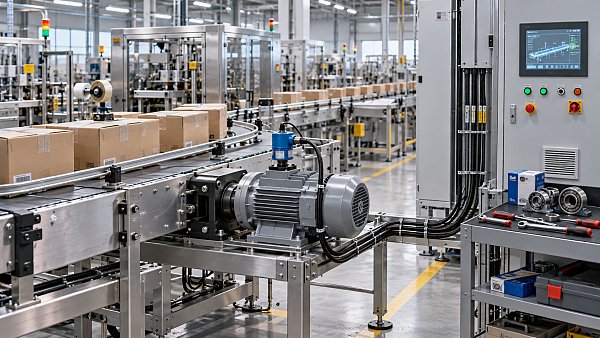
Should I upgrade human machine interfaces on older production lines? It is a sensible question, but it is often asked too late—usually after a touchscreen fails, a replacement panel becomes difficult to source, or operators start relying on handwritten notes because the existing HMI cannot show the information they need.
An HMI upgrade is not simply a cosmetic replacement for an old operator panel. On a production line that has been running for ten, fifteen, or twenty years, the HMI may be tied to PLC communications, drive parameters, alarm logic, recipes, quality records, maintenance routines, and the habits of experienced operators. Replacing it can improve usability, diagnostics, connectivity, and lifecycle support. Done poorly, it can create avoidable downtime or reveal weaknesses in the wider control system.
The right decision depends on the condition of the line, the availability of existing components, the value of lost production time, and the plant’s plans for automation, traceability, and future product changes. For some machines, a focused HMI retrofit is a practical way to extend useful life. For others, it only postpones a larger controls modernization that should be planned properly.
The warning signs are usually operational, not visual
A faded display, unresponsive touchscreen, or cracked membrane keypad is easy to see. More important problems tend to appear in daily operation. Operators may need to move between several screens to diagnose a basic stoppage. Alarm messages may be vague, such as “Fault 23,” with no indication of the affected station, probable cause, or safe recovery sequence. A technician may need a laptop and a legacy software package just to confirm whether a sensor, drive, or interlock is preventing restart.
These issues matter because the HMI is where the line’s control logic becomes understandable to people. If the interface makes normal tasks slow or fault recovery uncertain, the plant loses more than a display. It loses operator confidence and maintenance time.
Older systems also become vulnerable when a panel, communication card, or programming cable is no longer supported. A line may continue to run reliably for years, but a single failed display can turn into a long outage if the replacement market is limited or the program cannot be migrated without specialist knowledge. This is particularly relevant for packaging lines, metalworking equipment, conveyors, process skids, and material-handling systems where the mechanical asset still has plenty of productive life left.
A practical trigger for action is not “the HMI looks old.” It is whether the existing interface has become a source of production risk, maintenance friction, limited visibility, or parts exposure.
What a well-planned HMI upgrade can actually change
Modern HMI platforms can make an older production line easier to operate without changing the machine’s fundamental process. Better screen design can group alarms by station, show active permissives, present maintenance instructions, and make recipe changes more controlled. For lines with frequent format changes, a clearer recipe workflow can reduce the chance that an operator enters the wrong setting or skips a confirmation step.
The upgrade may also improve access to production information. A legacy panel often displays only what is needed at the machine. A newer architecture may support controlled data exchange with supervisory systems, maintenance tools, production reporting platforms, or an industrial network. That does not mean every old line needs a full manufacturing execution system connection. In many plants, simply making downtime reasons, counts, alarms, and energy-related readings easier to collect is already useful.
There is another benefit that is easy to underestimate: engineering continuity. A current HMI platform, documented application files, standard communication hardware, and backed-up configuration reduce dependence on one retired integrator or one long-serving employee who understands the original machine. For capital equipment owners, that resilience can be as valuable as the new screen itself.

Still, an HMI cannot repair poor control logic, worn mechanical systems, unstable sensors, or undersized drives. It can expose those problems more clearly, which is helpful, but it should not be sold internally as a universal cure for low output or high scrap.
Start with the controls architecture, not the screen size
The first technical question is whether the new HMI can communicate reliably with the installed PLC, remote I/O, drives, barcode readers, vision equipment, and other devices on the line. Older systems may use serial communication, proprietary protocols, early Ethernet implementations, or network topologies that do not map neatly to a modern panel.
Compatibility must be confirmed at the level of actual hardware and software versions. It is not enough to know that a proposed HMI “supports the PLC brand.” The engineering team should verify the PLC model, firmware where relevant, communication protocol, tag structure, available network ports, and any existing dependencies on the old panel. Some legacy HMIs contain scripts, embedded recipe files, alarm histories, user accounts, or calculation logic that is not obvious from the PLC program alone.
This is why a site survey and application backup should happen before purchase orders are issued. If the original HMI project file cannot be found, engineers may need to reconstruct screens and functions from the running machine, electrical drawings, PLC logic, and operator input. That work is manageable in many cases, but it changes the scope, schedule, and risk profile of the project.
A quick decision framework
Do not copy the old screens without questioning them
One common mistake is treating the project as a screen-for-screen conversion. In a low-risk replacement, that may be appropriate; preserving established machine behavior can minimize commissioning time. But older interfaces often reflect the limitations of their original hardware rather than the best way to run the machine today.
Operators should be involved early, especially those who run changeovers, resolve recurring faults, or perform startup after planned maintenance. They can identify which information is genuinely useful and which screens are rarely touched. Maintenance personnel often want different information from production staff: live I/O status, device feedback, fault history, permissive logic, and clear identification of a failed component.
Good HMI design should make normal operation straightforward and abnormal conditions easier to understand. It should not overwhelm users with every available tag. A crowded dashboard may look advanced during a project review but become frustrating on a noisy shop floor. Prioritize current machine state, safe actions, clear alarms, and the information needed to recover without bypassing safeguards.
Cybersecurity and safety boundaries need separate attention
Adding Ethernet connectivity to an old machine can be useful, but it changes the security discussion. A production line that was once isolated may become visible to plant networks, remote support tools, or data collection systems. That connection should be designed with the plant’s industrial cybersecurity policies, network segmentation practices, user access requirements, and supplier support arrangements in mind.
The HMI should not become an informal bridge between office IT and machine controls. Remote access, if permitted, should be controlled, documented, and appropriate for the equipment’s operating environment. Default accounts, unmanaged removable media, and undocumented network changes create unnecessary exposure, particularly where the line supports essential production or handles sensitive process data.
Safety functions require equally careful treatment. A new HMI can display safety status and guide recovery steps, but it should not be assumed to replace safety-rated controls. Emergency stops, guards, safety relays, safety PLC functions, and related validation requirements remain their own engineering domain. If the modernization changes control behavior, restart logic, or safety-related interfaces, the responsible engineering team should review the change against the applicable machine and site requirements.
Budget for commissioning, documentation, and training—not just hardware
The panel itself is often the most visible item in an HMI upgrade budget, but it is rarely the whole job. Costs and scheduling effort may include application development, electrical modifications, network changes, enclosure work, testing, commissioning support, operator training, software licensing, and the creation of usable backups.
Downtime planning deserves particular discipline. A line may need to be stopped for panel installation, but the real commissioning window begins when the machine is powered up and every sequence is tested. Inputs, outputs, alarms, recipes, user permissions, communications, and restart behavior all need verification. If production cannot tolerate a long interruption, consider staging work off-line where possible, using a representative PLC or simulator, and scheduling the final cutover during a planned maintenance period.
Before handover, insist on current electrical drawings, software backups, passwords held under the plant’s control, revision records, and a basic recovery procedure. These items do not make an upgrade look exciting, but they determine whether the next fault is a routine maintenance event or an emergency call to a specialist.
When an HMI-only upgrade is the wrong answer
There are situations where replacing only the HMI is not the best investment. If the PLC platform is already unsupported, the drive system has persistent reliability issues, the control cabinet wiring is in poor condition, or the machine has no credible documentation, a display upgrade may leave the plant with the same underlying exposure.
The same applies when the business need is much larger than visualization. A factory planning new product formats, robotics integration, machine vision inspection, detailed traceability, or centralized production management may need to review the line’s PLC capacity, network structure, sensors, motion system, and data architecture together. Installing a new HMI can still be part of that roadmap, but it should not define the roadmap.
For asset owners, the useful comparison is not simply “replace panel versus keep panel.” It is “what level of modernization reduces the most meaningful operational risk for the expected remaining life of the machine?” That is a lifecycle question involving spare parts, maintenance capability, lost-production exposure, energy use, changeover demands, and future automation plans.
Make the decision as part of an asset strategy
Older production lines are often dismissed too quickly because their interfaces look dated. In reality, a mechanically sound line with stable process performance can remain commercially valuable when its controls are modernized thoughtfully. The best HMI upgrades make the equipment easier to operate, easier to troubleshoot, and less dependent on obsolete parts or undocumented knowledge.
Industrial Edge Global approaches this kind of decision as an equipment lifecycle issue rather than a narrow component purchase. The useful questions extend beyond panel specifications: Can the line be supported? What production information is missing? Which risks are technical, and which are organizational? Will the proposed architecture still make sense when the plant adds new automation or changes its product mix?
Upgrade the HMI when it solves a defined operational problem and fits a supportable controls architecture. Pause when the panel is merely the most visible symptom of a deeper modernization need. That distinction can prevent a rushed replacement today from becoming another legacy constraint a few years from now.
Related News
 MSHA Issues Mine Truck Safety Alert After One Death and 121 InjuriesMining Infrastructure ExpertMSHA mine truck safety alert reports one death and 121 lost-time injuries. Discover why mine operators should review safety practices.
 How to size a crushing plant for ore processingMining Infrastructure ExpertSize your ore processing equipment crushing plant with confidence. Learn how to calculate throughput, assess ore characteristics, and prevent bottlenecks.
 Trump Administration Rewrites Mining Policy to Spur Critical Minerals DevelopmentMining Infrastructure ExpertU.S. critical minerals mining policy is changing. Explore what faster approvals could mean for investment, equipment demand and supply chains.
 How IEC 62443 defines security zones for industrial communication systemsRobotics EngineerExplore industrial communication systems and IEC 62443: learn how security zones, conduits, and risk-based controls help protect plant operations.
 China-Peru Trade Agreement Upgrade Takes Effect, Easing Machinery CertificationConstruction Equipment SpecialistThe China-Peru trade agreement upgrade simplifies machinery certification. Discover what mutual recognition could mean for exporters entering Peru.
 How do industrial control systems regulate water treatment?Robotics EngineerDiscover how industrial control systems in water treatment use sensors, PLCs, and SCADA to regulate processes and help operators respond to changing conditions.
 Exotec Report: 25% of Supply Chain Leaders Regret Warehouse Automation DecisionsRobotics EngineerWarehouse automation regret affects 25% of surveyed supply chain leaders, according to Exotec. Explore the cost, contract and readiness risks before investing.
 How to set maintenance intervals for mining equipment in AustraliaMining Infrastructure ExpertMining equipment maintenance Australia: Learn how to set service intervals using operating hours, site conditions and equipment data to reduce downtime.
 EY Survey Ranks Complexity as Mining's Top Risk for 2027Mining Infrastructure ExpertMining risk in 2027 is led by complexity, EY's survey finds. Discover how aging mines, declining ore grades and supply chain pressures are reshaping the industry.
 Can asset lifecycle management automation reduce equipment downtime?IEG Heavy Machinery & Automation AnalystDiscover how asset lifecycle management automation can reduce equipment downtime through timely maintenance, faster repairs, and smarter service workflows.
 Caterpillar Q3 2026 Revenue Rises 17% to $20.7 Billion as Both Equipment Segments GrowConstruction Equipment SpecialistCaterpillar Q3 2026 revenue reportedly rose 17% to $20.7 billion. Explore equipment segment growth and what it could mean for procurement planning.
 How to choose a rugged industrial control panel for wet environmentsRobotics EngineerChoose a rugged industrial control panel for wet environments. Compare IP ratings, materials, seals, and condensation control to improve reliability.